
Download Instantgen – AI‑Powered Content Creation Tool
Overview
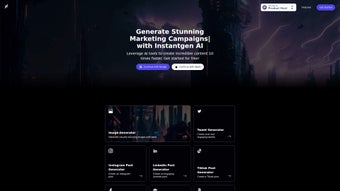
Instantgen is a web‑based, AI‑driven content creation platform that brings together the power of state‑of‑the‑art image generators (DALLE, Stable Diffusion) and intelligent text generators to help marketers, social‑media managers, and eCommerce owners produce high‑quality visuals and copy in a fraction of the time required by traditional workflows. By simply typing a natural‑language prompt, users can generate custom images that match brand guidelines, create platform‑specific social posts for Twitter, Instagram, Facebook, TikTok, and LinkedIn, and even craft product descriptions for Amazon, Etsy, or Shopify listings. The tool requires no local installation; a modern browser is enough to access the full suite of features, making it a truly cross‑platform solution for Windows, macOS, Android, and iOS users alike.
Instantgen also offers single‑sign‑on via Google or Apple accounts, a built‑in newsletter for updates, and a detailed FAQ that covers everything from billing to AI model limitations. The promise of “ten‑times faster” content creation is backed by an intuitive interface, real‑time preview, and the ability to export assets directly to your favorite publishing tools. Whether you’re a solo creator looking to scale your output or a large agency needing consistent brand‑compliant assets, Instantgen positions itself as the go‑to AI assistant for rapid, secure, and scalable content production.
Key Features & Capabilities
- AI Image Generation: Leverages DALLE and Stable Diffusion to turn text prompts into high‑resolution images, with style controls for illustration, photography, or abstract art.
- Social‑Media Post Generators: Pre‑built templates for Twitter, Instagram, Facebook, TikTok, and LinkedIn that automatically format captions, hashtags, and image dimensions.
- eCommerce Copy Engine: Generates SEO‑friendly product titles, bullet points, and long‑form descriptions tailored to Amazon, Etsy, and Shopify marketplaces.
- Product Email Writer: Creates professional outreach emails, follow‑up sequences, and promotional newsletters with customizable tone settings.
- One‑Click Export: Download assets as PNG, JPG, or PDF, or push content directly to connected social‑media accounts via API.
- Multi‑User Collaboration: Team workspaces allow multiple users to share prompts, edit drafts, and approve final assets in real time.
- Secure Cloud Storage: All generated content is stored on encrypted servers, giving you control over privacy and compliance.
- Continuous Updates: New AI models and template packs are rolled out automatically, ensuring you always have access to the latest technology.
Beyond the list above, Instantgen’s architecture is built for scalability. The platform can handle bulk generation requests, making it suitable for agencies that need to produce hundreds of product images or descriptions overnight. Its AI models are fine‑tuned to reduce hallucinations, delivering more accurate visual representations and factual copy. The UI follows a “prompt‑first” philosophy: you type, the AI responds, you tweak, and you export—no steep learning curve required. Additionally, the built‑in analytics dashboard tracks how many assets you’ve created, average generation time, and conversion metrics when you integrate with eCommerce platforms, helping you measure ROI directly from the tool.
Installation, Usage & Compatibility
Because Instantgen is delivered as a cloud service, there is no software to download or install on your local machine. All you need is a stable internet connection and a modern web browser (Chrome, Edge, Firefox, or Safari) that supports WebGL for image rendering. To get started, follow these simple steps:
- Create an Account: Click the “Sign Up” button on the homepage and choose either Google or Apple SSO for a quick registration. You can also opt for an email‑based account if you prefer.
- Verify Your Email: A verification link will be sent to your inbox; click it to activate your account.
- Select a Plan: Instantgen offers a free tier with limited daily generation credits and a paid subscription that unlocks unlimited usage, higher resolution exports, and priority AI processing.
- Choose a Generator: From the dashboard, pick “Image Generator,” “Social Post,” “Product Description,” or “Email Writer.” Each module presents a clean prompt box and optional style sliders.
- Enter Your Prompt: Type a natural‑language description (e.g., “A minimalist coffee mug with pastel colors on a wooden table”) and hit “Generate.” The AI returns several variations within seconds.
- Refine & Export: Use the built‑in editor to adjust colors, crop, or edit copy. Once satisfied, click “Download” or “Publish Directly” to your connected platforms.
Compatibility: As a browser‑based service, Instantgen runs on Windows, macOS, Linux, Chrome OS, Android, and iOS devices. The platform automatically adapts its layout for desktop and mobile screens, ensuring a seamless experience whether you’re working from a laptop or a tablet. Because all processing occurs in the cloud, even low‑powered devices can generate complex images without lag.
The security model follows industry best practices. All data transmission is encrypted via HTTPS, and user content is stored in GDPR‑compliant data centers. For teams, administrators can enforce two‑factor authentication (2FA) and set role‑based permissions to control who can generate, edit, or export assets. In short, getting started with Instantgen is as easy as signing into a website, but the underlying AI capabilities feel like a powerful desktop application.
Pros, Cons, FAQ & Conclusion
Pros & Cons
- Pros:
- No installation required – works entirely in the browser.
- Fast generation times, often under 10 seconds per image.
- Supports major social platforms and eCommerce marketplaces.
- Free tier available for occasional users.
- Secure cloud storage with encryption and 2FA options.
- Continuous model updates keep the AI cutting‑edge.
- Cons:
- High‑resolution exports are limited to paid plans.
- Dependent on internet connectivity; offline use isn’t possible.
- Creative control can feel limited for advanced designers who prefer manual tweaking.
- Free tier imposes daily credit caps, which may be restrictive for power users.
Frequently Asked Questions
Is Instantgen really free to use?
Instantgen offers a free tier that provides a limited number of daily generation credits. This is ideal for testing the platform or for occasional creators. For unlimited access, higher‑resolution downloads, and priority processing, a paid subscription is required.
Can I use the generated images for commercial purposes?
Yes. All images created with Instantgen are owned by the user who generated them, and they can be used commercially, including in advertising, product listings, and printed materials, provided you adhere to the platform’s acceptable‑use policy.
How does Instantgen ensure the privacy of my prompts and generated content?
All data is transmitted over HTTPS and stored in encrypted cloud storage. Instantgen complies with GDPR and CCPA regulations, and users can delete their content at any time from the dashboard.
What browsers are supported?
Instantgen works with the latest versions of Chrome, Edge, Firefox, and Safari. Mobile browsers on Android and iOS are also fully supported.
Can I integrate Instantgen with my existing workflow tools?
Yes. Instantgen provides API endpoints and webhook support for connecting with popular project‑management, CMS, and social‑media scheduling platforms. Documentation is available in the “Developers” section of the site.
Conclusion & Call to Action
Instantgen positions itself as a comprehensive, AI‑powered content creation suite that eliminates the bottlenecks of manual design and copywriting. Its blend of cutting‑edge image generators, ready‑made social‑media templates, and eCommerce copy tools delivers a compelling value proposition for anyone who needs to produce high‑quality digital assets quickly and securely. While the free tier provides a generous taste of the platform, businesses that require unlimited generation and premium export options will find the subscription pricing justified by the time savings and brand consistency Instantgen offers. If you’re ready to accelerate your content workflow, reduce reliance on multiple disjointed tools, and tap into the latest AI models without any installations, click the button below to start your free trial today.
Instantgen delivers on its promise of rapid, high‑quality content generation. The web‑based interface is intuitive, the AI output is impressively accurate, and the integration options make it a strong contender for marketers and eCommerce teams alike. Minor drawbacks like limited free‑tier credits are outweighed by the productivity boost for paid users.






